Home → Wallmount Case → Applications
Wallmount Case Applications
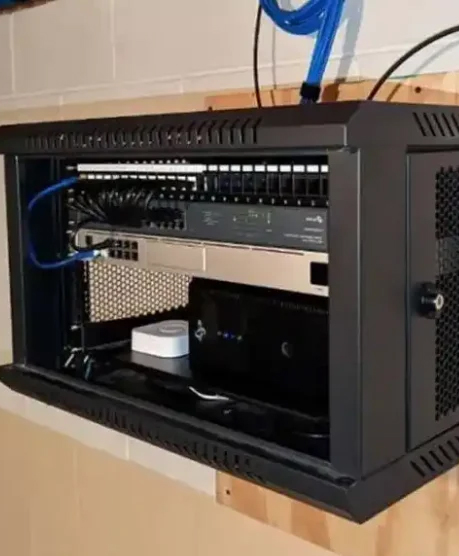
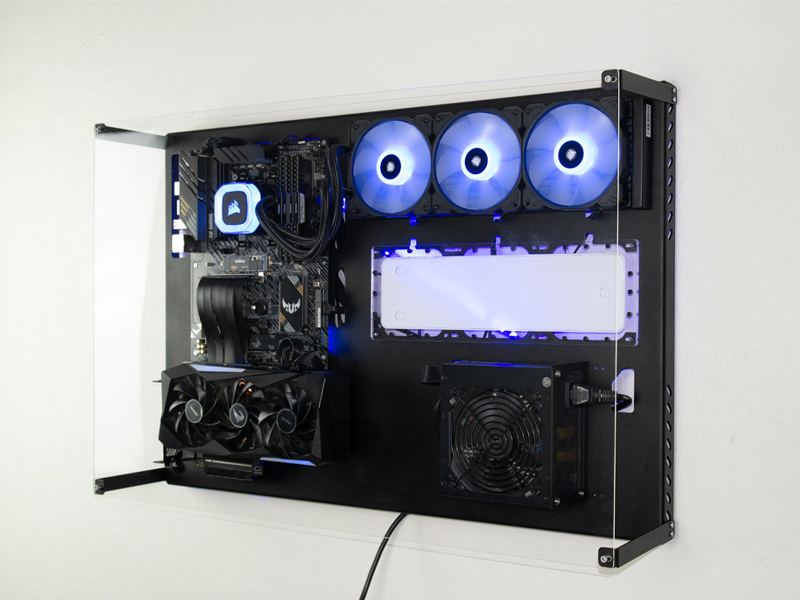
Wallmount server cases are built for space-constrained environments where you still need real expansion, cooling, and serviceability. This page targets long-tail searches around —and helps you map each workload to the right chassis configuration.
Overview
When wallmount beats racks:
- (branch office, shop floor, security room, lab wall).
- and clean cable management near the wall.
- with bracket/hinge access and simple service workflow.
confirm total system weight (chassis + PSU + cards + drives) and use anchors appropriate for your wall structure.
Applications / Use Cases
Edge AI Inference (Retail / Branch / On-Prem Rooms)
Pain points
- Limited floor space and no rack cabinet.
- Higher ambient temps and dust in mixed-use rooms.
- Need fast replacement without moving equipment.
Requirements
- Compact wallmount chassis with stable airflow.
- PCIe clearance for an accelerator or high-speed NIC.
- Front access for fans/drives and clear indicators.
Key metrics
- Depth fit + rear cable clearance.
- Expansion slot count (2/4/6/7-slot layouts).
- Dust control and fan size.
Recommended configuration
- 2–4 slot wallmount case for compact inference nodes.
- Optional dustproof front and easy-clean fan access.
- Choose motherboard support based on your platform (ATX/mATX/Mini-ITX).
Industrial Automation & Machine Vision (Factory / Warehouse)
Pain points
- Dust, vibration, and higher inlet temperatures.
- Space constraints near production lines.
- Need reliable I/O and expansion for capture/NIC cards.
Requirements
- Rigid steel enclosure with secure door/cover.
- Filtered airflow and service-friendly cleaning.
- Enough PCIe slots for industrial I/O cards.
Key metrics
- Filter access and airflow path integrity.
- Slot clearance (card length/height) and cable routing.
- Thermal headroom for continuous duty.
Recommended configuration
- 4–6 slot wallmount case for I/O-heavy edge controllers.
- Consider industrial case families for harsher conditions.
Surveillance NVR & Video Analytics (Security Rooms)
Pain points
- 24/7 operation with continuous storage writes.
- Drive heat and vibration sensitivity.
- Need expansion for NIC/HBA/capture cards.
Requirements
- Drive bay capacity aligned to retention policy.
- Airflow over drive zones and controller areas.
- Easy access for drive swap and fan cleaning.
Key metrics
- 3.5"/2.5" bay count and mounting method.
- Fan placement and noise expectations.
- Slot count for NIC/HBA/accelerators.
Recommended configuration
- 4–7 slot wallmount case for storage + I/O growth.
- For storage-dense builds, consider NAS case categories.
Networking, SD-WAN & Telecom Edge (Comm Rooms)
Pain points
- High port density and cable management near the wall.
- Need expansion for multi-port NICs and timing cards.
- Service must be possible in tight spaces.
Requirements
- Clear rear clearance planning and tidy routing.
- Stable airflow with minimal blockage.
- Secure mounting and lockable access (as needed).
Key metrics
- Slot count, card length, and clearance plan.
- Front I/O and indicator visibility.
- Depth and door/hinge opening clearance.
Recommended configuration
- 4–7 slot wallmount case for NIC-heavy edge routers.
- Choose PSU capacity with headroom for NICs and fans.
Lab, Test Benches & Remote Kits (Quick Access Builds)
Pain points
- Frequent component swaps and short project cycles.
- Need clear access without rack handling.
- Multiple platforms increase variation.
Requirements
- Fast-open cover, accessible I/O, clear labeling.
- Flexible motherboard support and bay options.
- Simple assembly workflow for repeat builds.
Key metrics
- Service time (cover open, card swap, drive swap).
- Clearance for test cards and cable routing.
- Mounting method and reposition flexibility.
Recommended configuration
- 2–4 slot wallmount case for quick-access lab nodes.
- Pre-integration/assembly service to reduce deployment time.
Selection Checklist
| Cooling | Fan size/quantity, static pressure, hot zones (CPU / NIC / drives), thermal margin for continuous duty. |
|---|---|
| Airflow | Clear intake/exhaust path, cable obstruction control, dust filter access, wall clearance for airflow. |
| PCIe | Slot count (2/4/6/7), card clearance (length/height), layout for NIC/HBA/accelerator cards. |
| Power | PSU form factor, wattage headroom, connector planning, uptime requirements. |
| Drive bays | 3.5″/2.5″ bay count, storage airflow, swap workflow, vibration considerations for HDD fleets. |
| Motherboard | Supported sizes (ATX/mATX/Mini-ITX), CPU cooler clearance, front I/O needs. |
| Depth | Overall depth + rear cable bend radius, door/hinge swing clearance, proximity to power/network. |
| Rails | Wall bracket/hinge kit, load rating, anchor type for wall structure, safety/locking needs. |
| Maintenance | Fan/filter cleaning access, drive access, tool-less panels, clear indicators, quick swap workflow. |
FAQ
1) What is a wallmount case?
A wallmount case is a server/PC chassis designed to mount on a wall using a bracket or hinge mechanism. It’s used when there is no rack cabinet, or when you need a compact, serviceable enclosure in tight spaces.
2) When should I choose a wallmount case instead of a rackmount case?
Choose wallmount when floor space is limited, you don’t have a rack cabinet, or you need a clean wall installation for branches, industrial areas, or security rooms. Choose rackmount when you need standardized data center rack deployment.
3) How do I verify mounting safety for a wallmount chassis?
Confirm the fully loaded weight (chassis + PSU + cards + drives), then match it to the wall structure (studs, concrete, etc.) and use appropriate anchors. Plan for safe opening/hinge clearance and secure locking if needed.
4) What are the most important thermal considerations?
Ensure unobstructed intake/exhaust, adequate wall clearance for airflow, and easy access for cleaning dust filters and fans. For 24/7 workloads, choose configurations with thermal headroom rather than running at the limit.
5) How do I choose slot count (2/4/6/7) for my application?
Start with your expansion plan: NICs, HBAs/RAID, capture cards, or accelerators. Add headroom for future growth, and confirm card length/height clearance and cable routing space.
6) Can wallmount cases support storage-heavy builds?
Yes, but verify drive bay count, airflow across drive zones, and controller placement. For very storage-dense requirements, consider NAS chassis categories designed around bay density.
7) What information should I include when requesting a recommendation?
Share motherboard size, PCIe cards, number/type of drives, PSU preference, depth limits, wall type, environmental conditions (dust/temperature), and expected service workflow.
8) Do you offer OEM/ODM customization for wallmount cases?
Yes. Typical customization includes I/O cutouts, bay layout, airflow baffles, branding, and assembly services for repeat deployments.