ぜひ弊社まで サーバーシャーシ エンジニアおよび営業チーム




チャンネル登録者数24,000人
お客様の用途、シャーシの種類、ラックの高さ、マザーボード、GPU、ドライブベイ、電源、冷却システム、I/O、および注文数量をお知らせください。当社のエンジニアおよび営業チームが、お客様のプロジェクトに適した標準モデルまたはOEM/ODM構成をご提案いたします。.

Heavy GPUs changed the rules.
A decade ago, many graphics cards could sit horizontally in a system with little discussion beyond securing the rear expansion bracket with a screw. Today, a high-end accelerator may be long, thick, heavily cooled, and heavy enough that its mechanical behavior deserves the same engineering attention as airflow or power delivery.
That is where the GPU固定ブラケット becomes important.
It looks simple. Sometimes it is just a steel crossmember, adjustable support, card guide, end stop, or reinforced mounting structure. Yet that small component can determine how much of the GPU’s mass is carried by the motherboard, how freely the card can move during transportation, and whether the system remains mechanically consistent after repeated handling.
For an enthusiast PC, visible GPU sag may be annoying.
For an OEM shipping hundreds of systems?
Different problem.
Consider one current flagship card.
According to MSI’s official specifications for the GeForce RTX 5090 Gaming Trio OC (opens in a new tab), the card measures 359 × 149 × 70 mm and weighs 2,119 g. It also uses a large multi-slot cooling assembly.
That 2.1 kg mass is not sitting directly above the PCIe connector.
Much of it extends outward.
The farther the card’s mass extends from its mounting points, the more leverage the assembly can place on the PCIe interface, PCB, rear mounting bracket, and surrounding chassis structure.
This is basic mechanics.
A GPU may be electrically connected through the PCIe edge connector and mechanically fastened at the rear expansion slots, but those points do not automatically provide ideal support for every large card geometry.
The chassis therefore needs to answer another question:
Where does the GPU’s weight actually go?
優れたデザイン Graphics Card Support Bracket gives engineers another point—or several points—through which that load can be transferred into the enclosure.
That changes the mechanical system.
A GPU Support Bracket restrains or supports a graphics card so its weight and movement are not controlled only by the motherboard PCIe slot and rear I/O mounting area.
Depending on the chassis, it may:
The exact design varies considerably between consumer towers, workstations, industrial PCs, and GPU servers.
The principle does not.
Control the mass before the mass controls the system.
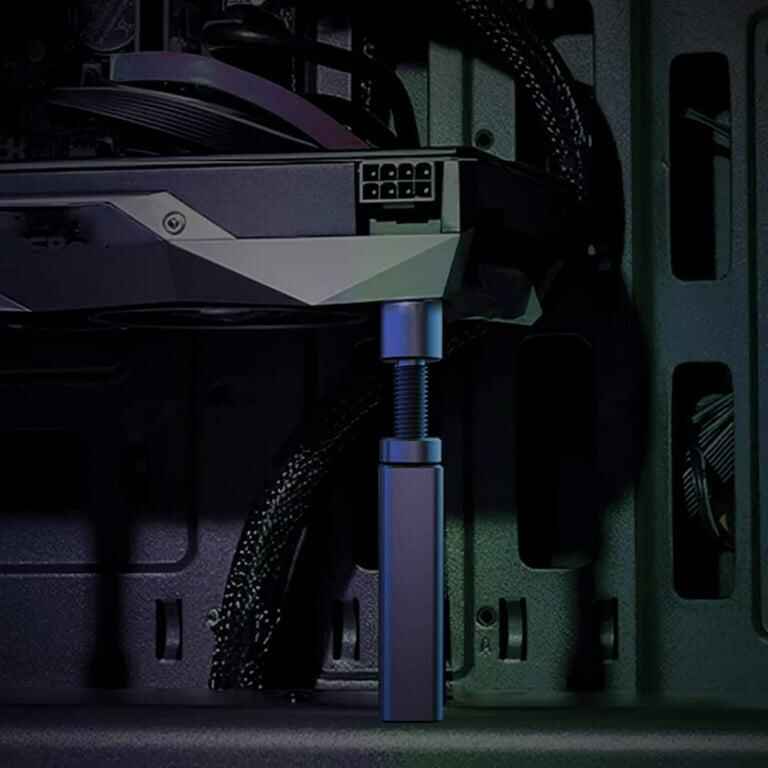
Imagine holding a long metal bar from only one end.
Easy with a short bar.
Make it longer and heavier, and suddenly the unsupported end wants to drop. Small movements at the far end generate force back at your hand.
A horizontal GPU behaves in a similar way.
Without secondary support, much of the card’s mechanical load must ultimately be reacted through a relatively small number of interfaces.
Add a properly positioned support point and the load path changes.
| System Condition | Without Additional GPU Support | With Proper Retention |
|---|---|---|
| Static GPU weight | Concentrated around PCIe/rear mounting area | Shared with chassis support structure |
| Long-card sag | More dependent on GPU and motherboard stiffness | Better controlled |
| Handling movement | Card can have greater freedom to move | Movement can be restricted |
| Transportation shock | Higher potential leverage at mounting points | Load can be distributed across more restraints |
| Multi-GPU alignment | Depends heavily on slot and card positioning | Easier to mechanically locate cards |
| Connector alignment | Can shift if the card deflects | More consistent card positioning |
| Service/reinstallation | Alignment can vary between technicians | Repeatable locating features can help |
A bracket cannot magically eliminate every mechanical load.
Nor should it.
The goal is to manage those loads intentionally.
Placement matters more than many buyers realize.
ASUS’s current graphics-card holder guidance says that as graphics cards become larger and heavier, a holder provides additional reinforcement and helps prevent sagging or bending caused by the card’s own weight. ASUS recommends locating the support point near the upper-right portion of the card, close to its center of gravity, then ensuring the holder contacts a sturdy area of the heatsink housing. ASUS explains the installation approach here (opens in a new tab).
That recommendation highlights an overlooked point.
Simply adding a bracket is not enough.
Put the support in the wrong location and you may still leave a long unsupported span. Apply pressure to a weak plastic shroud and the support itself may cause unwanted deformation. Make the bracket difficult to adjust and assembly technicians may position it inconsistently.
The contact point should be designed.
Not guessed.
について GPU Sag Prevention in a custom chassis, engineers should review card dimensions, mass distribution, heatsink construction, motherboard location, riser configuration, available mounting surfaces, and service clearances before freezing the mechanical layout.
Here is an unpopular opinion in our industry:
A reinforced PCIe slot does not eliminate the need for proper GPU support.
Reinforcement is useful.
It is not magic.
A stronger slot may improve the local mechanical condition around the motherboard connector, but it does not make the rest of a 300-plus-millimeter graphics card weightless. It does not automatically stop the far end of the card from moving. It does not secure a heatsink during a hard shipping event. And it certainly does not redesign the chassis load path.
Too many builders still look at an anti-sag device as cosmetic hardware.
Straight GPU = job done.
I disagree.
The better question is not:
“Can the PCIe slot hold this GPU?”
It is:
“Where are the loads going during installation, years of operation, servicing, rack movement, and transportation?”
That question forces engineers to think about the entire assembly.
A cheap GPU Anti-Sag Bracket installed wherever there happens to be room may improve appearance, but appearance is not the engineering objective. Stable positioning, repeatable assembly, controlled loading, cooling clearance, and safe service access are.
Static operation is only part of the story.
Shipping can be nastier.
A 2 kg GPU sitting quietly inside a stationary workstation imposes one type of load. That same GPU inside a carton that is tipped, dropped, rolled through a distribution center, loaded onto a truck, unloaded, and moved again experiences a very different mechanical environment.
Dell’s current Alienware Area-51 documentation makes this point unusually clear.
Dell states that, depending on the installed GPU, the system may ship with a midholder designed to prevent damage to both the graphics card and the PCIe holder on the system board during shipping. Dell also notes that RTX 5090-equipped systems use a specially engineered extender that provides additional support and stability instead. Dell documents the system here (opens in a new tab).
That is worth paying attention to.
A major OEM is not adding mechanical restraint because the GPU looks crooked in a product photo.
It is addressing transportation risk.
Recently, while reviewing public PC-building forums, I came across a transport-damage case that should make any system integrator uncomfortable.
The system contained an RTX 3080.
The owner reported that after transportation, the PCIe slot was bent and broken, the GPU’s PCIe connector was heavily scratched, the PCB was bent, and a capacitor had broken off the motherboard. The owner later added that even the anti-sagging bracket had been bent. You can read the original Reddit transport-damage discussion here (opens in a new tab).
That thread is anecdotal. It is not controlled laboratory evidence, and it should not be treated as a published failure-rate study.
Still, the engineering lesson is hard to miss.
The system did not merely have an ugly sagging GPU. Several mechanical interfaces were involved in the damage.
That is why I no longer view retention as a minor accessory discussion.
Once you ship heavy GPUs already installed inside a chassis, mechanical restraint becomes part of packaging and system design.
One heavy card is manageable.
Now install four.
Or eight.
GPU and AI servers introduce another layer of complexity because card positioning affects more than mechanical appearance. The chassis may need to coordinate GPU spacing with:
The site’s own GPU server application guide identifies GPU weight, support brackets, card spacing, PCIe topology, airflow, and power as part of complete chassis evaluation.
This is the right way to think about it.
A retention system cannot be designed independently from thermal and electrical architecture.
Put a structural bar directly in front of a blower inlet and you may solve one problem while creating another.
Block the removal path for a failed GPU and service time goes up.
Route high-current power cables through the same space required by an adjustable bracket and technicians may start improvising during assembly.
That never ends well.
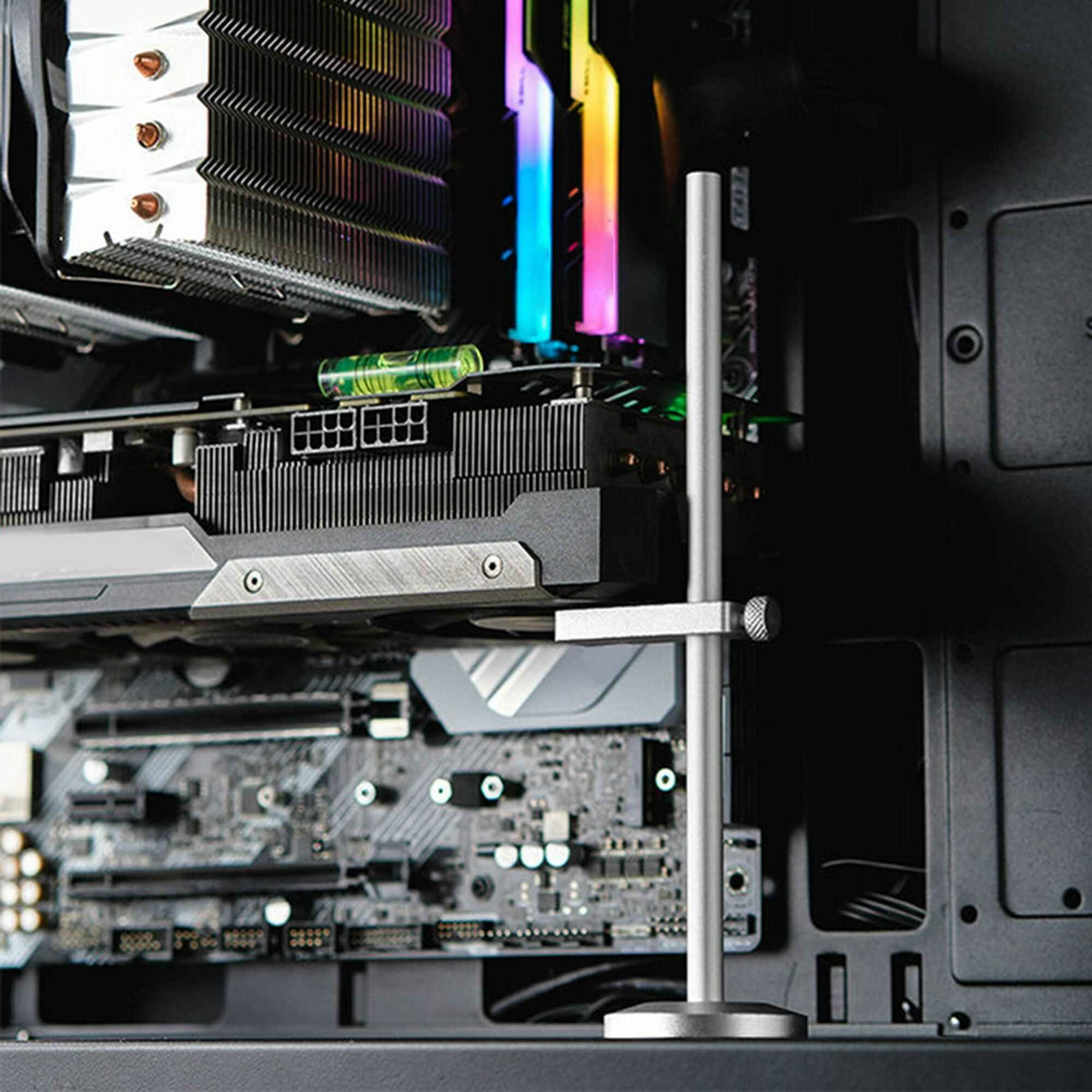
These support the far end of a horizontally installed graphics card.
They are simple and effective when card dimensions are predictable. Adjustable versions can accommodate multiple GPU models, but the adjustment range and locking mechanism need to remain stable.
A horizontal or vertical structural member spans part of the enclosure and supports one or more cards.
This approach makes sense in workstation, industrial, and multi-GPU designs where the chassis manufacturer controls the internal architecture.
A properly engineered crossbar can also provide cable-routing or card-location features.
These locate each GPU independently.
They are particularly useful where several PCIe cards sit in parallel and spacing must remain consistent.
習慣 PCIe Card Retention Bracket can be integrated into an OEM/ODM chassis rather than added later as a universal accessory.
These may not remain installed while the machine operates.
Their purpose is simple: stop expensive components from moving while the system is in transit.
Removable braces, molded packing inserts, internal foam systems, or temporary retention structures can all play a role depending on the product and shipping method.
Do not confuse operational support with shipping restraint. One bracket may perform both jobs, but that should be verified rather than assumed.
Do not send a chassis supplier a GPU model number and write, “Add support.”
That is too vague.
Give them engineering inputs.
Provide length, height, thickness, connector location, rear bracket dimensions, and any protrusions.
Physical fit should be checked against the actual production GPU or an approved mechanical drawing.
This matters.
Two cards with similar external dimensions can carry very different cooler assemblies and weight distributions.
Record the mass of every approved GPU option.
If this information is available, use it.
If not, engineers can evaluate where support should be placed using representative hardware and mechanical testing.
Supporting one card is not the same as locating eight cards.
Multi-GPU systems may benefit from a shared support structure rather than eight independent consumer-style props.
Tower?
Rackmount?
Wallmount?
Vertical GPU?
Horizontal GPU?
Gravity acts the same. The structural load path does not.
A bracket should not choke a fan inlet, interfere with an air shroud, block liquid-cooling tubes, or create a dead zone around a hot accelerator.
Current high-power GPUs can require substantial connector and bend clearance.
Make sure the retention structure leaves the required cable path intact.
How does a technician remove the GPU?
If servicing requires disassembling half the chassis to reach one bracket screw, the design needs another pass.
This one gets skipped.
Will the GPU ship installed?
Will the system travel by parcel carrier, pallet freight, air freight, or dedicated rack transport?
Will an integrator remove the GPU before shipment?
Those answers influence the restraint strategy.
CAD is necessary.
A prototype is better.
Install the heaviest and longest approved GPU. Install the actual power cable. Populate adjacent cards. Fit the side panel. Verify cooling clearances.
Then look closely.
Does the card visibly deflect?
Does the bracket contact a structurally appropriate surface?
Can the bracket loosen?
Can the card move laterally?
Is there room for assembly tolerances?
Can a technician remove and reinstall the GPU without forcing anything?
Does the card return to the same position after servicing?
Does the support interfere with airflow?
These checks are inexpensive during prototyping.
They become expensive after tooling, production, packaging approval, and shipment.
For projects requiring a purpose-built GPU Support Bracket for PC Case, bracket geometry should be reviewed together with chassis depth, motherboard format, PCIe slots, GPU quantity, cooling hardware, and rack constraints.
Visible sag is easy to photograph.
Movement is harder to see.
A card can look straight and still have inadequate lateral restraint for shipping or handling.
Do not assume every part of the fan shroud can carry load.
Support should contact a mechanically appropriate surface.
There is such a thing as over-constraining an assembly.
GPU dimensions, motherboard position, sheet-metal tolerances, and bracket fabrication tolerances all vary.
A design with zero adjustment may create assembly force instead of reducing it.
This happens more often than it should.
The mechanical team creates a beautiful retention structure.
Then the build team discovers there is nowhere to route the GPU power cable.
Anything installed eventually needs to come out.
Design accordingly.
“Full-height GPU” is not a complete mechanical specification.
Card lengths, thicknesses, shroud geometries, cooler shapes, PCB designs, and connector positions vary.
Validate the exact approved hardware.
No.
Small, light cards may not require secondary support beyond their normal PCIe and chassis mounting arrangement.
The need grows as several factors increase:
The decision should come from the application.
Not from fashion.
If you are sourcing a workstation, industrial PC, AI server, or custom GPU chassis, add mechanical GPU support to the RFQ.
Ask:
Those questions reveal far more than asking whether a chassis has “8 PCIe slots.”
Slots are capacity.
Retention is integration.
A GPU retention bracket will rarely be the most expensive component in a system.
That is precisely why ignoring it makes so little sense.
High-end GPUs now represent substantial mass, thermal hardware, power delivery, and cost concentrated into long PCIe assemblies. Once those cards are placed inside OEM workstations, AI servers, industrial systems, or shipped prebuilt machines, their mechanical support deserves deliberate engineering.
The best retention solution is not necessarily the thickest bracket.
It is the one that puts support in the right place, accommodates manufacturing tolerances, preserves cooling and serviceability, and transfers loads into the chassis without creating new problems.
Small part.
Big job.
A GPU retention bracket is a mechanical support that helps secure a graphics card inside a chassis and reduces unwanted movement or sag.
It can support the far end of the card, restrain lateral movement, maintain alignment, or provide additional protection during handling and transportation.
Yes, when properly designed, it can improve mechanical stability by controlling GPU movement and distributing load into the chassis.
Its effectiveness depends on bracket location, stiffness, GPU weight, chassis design, installation tolerance, and the type of movement the system needs to withstand.
It can reduce loads that would otherwise be reacted only through the GPU’s primary mounting points, but it does not guarantee PCIe-slot protection.
System stability depends on the complete mechanical design, including the motherboard, chassis, GPU bracket, card structure, packaging, and transportation conditions.
Support should generally be placed under a mechanically strong part of the card and positioned to reduce the unsupported load.
ASUS recommends placing its holder near the card’s center of gravity and contacting the heatsink housing rather than simply supporting any convenient point.
Heavy GPUs shipped inside complete systems may require additional restraint, depending on the system and packaging design.
Dell, for example, documents a dedicated midholder intended to protect both the graphics card and motherboard PCIe holder during shipping.
Not necessarily. A reinforced PCIe slot strengthens one part of the mounting system but does not control every load acting on a long, heavy graphics card.
Large GPUs may still benefit from additional support near the unsupported end or other chassis-level retention.
Often, yes. Multi-GPU systems have tighter requirements for card spacing, airflow, power cabling, serviceability, and mechanical positioning.
A chassis-level retention structure can be more appropriate than individual consumer-style brackets when several accelerators must be installed consistently.
Comments