저희와 상담해 보세요 서버 섀시 엔지니어 및 영업팀




구독자 24,000명
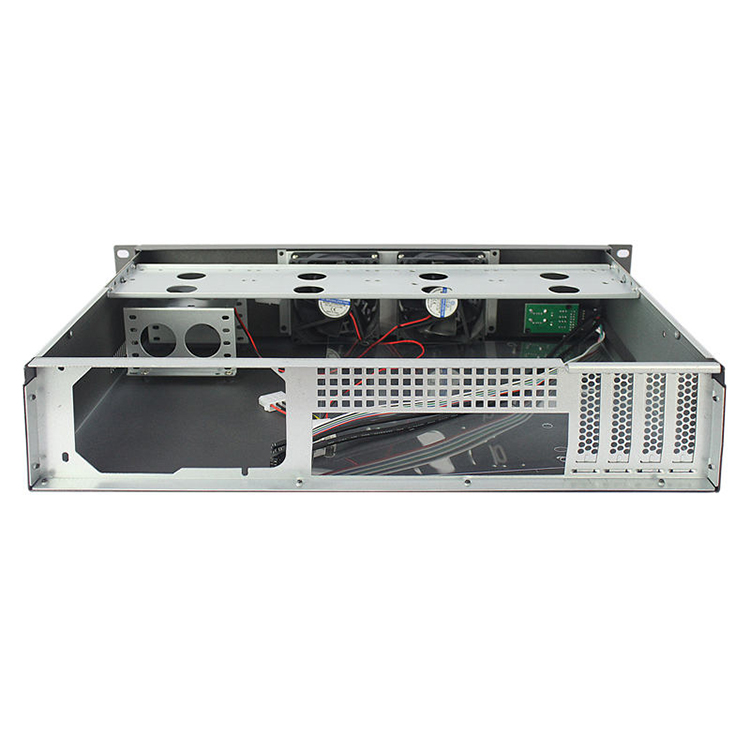
사용 목적, 섀시 유형, 랙 높이, 마더보드, GPU, 드라이브 베이, 전원 공급 장치, 냉각 시스템, I/O 및 주문 수량을 알려주십시오. 당사의 엔지니어 및 영업팀이 귀사의 프로젝트에 적합한 표준 모델 또는 OEM/ODM 구성을 추천해 드리겠습니다.

External reference links in this article are intended to be opened in a new tab.
If you search for 1U vs 2U vs 4U Server comparisons, most explanations start with physical height.
That is useful.
It is also nowhere near enough.
For an OEM buyer, system integrator, AI infrastructure builder, storage vendor, industrial computer company, or enterprise IT team, server height is really a proxy for a much larger engineering decision. Change the height and you may also change your fan architecture, CPU cooler, GPU orientation, PCIe risers, PSU format, drive count, motherboard options, cable routing, acoustics, and maintenance procedure.
That is why choosing between 1U, 2U, and 4U should happen after the architecture starts taking shape—not before.
A rack unit, normally written as U 또는 RU, measures vertical rack space.
According to Vertiv’s server rack sizing guidance, one rack unit equals 1.75 inches, or 44.45 mm, and 42U is one of the most common rack heights used in data centers.
That gives us the basic dimensions:
| 폼 팩터 | Nominal Height | Theoretical Units in a 42U Rack | Typical Design Priority |
|---|---|---|---|
| 1U | 1.75 in / 44.45 mm | 42 | Maximum rack density |
| 2U | 3.5 in / 88.9 mm | 21 | Density + expansion balance |
| 4U | 7 in / 177.8 mm | 10, with 2U remaining | Maximum component flexibility |
Those theoretical rack counts are only geometry.
A real rack also needs room for switches, cable management, patch panels, storage, PDUs, UPS equipment, blanking panels, or other infrastructure. Vertiv makes the same point when discussing practical 42U capacity.
This distinction matters because buyers often confuse rack density 와 함께 useful compute density.
They are not always the same thing.
If you are still establishing your basic Rack Unit Server Size requirements, start with the complete equipment layout rather than simply dividing 42U by the chassis height.
The attraction of 1U is obvious.
You can pack a lot of nodes into a rack.
For cloud infrastructure, web servers, telecom appliances, firewalls, edge compute, standardized CPU nodes, and other repeatable deployments, that density can be extremely valuable.
Modern 1U systems are hardly low-performance machines either. Dell’s current PowerEdge R670 documentation describes a 1U server supporting two Intel Xeon 6 processors, 32 DIMM slots, multiple storage configurations, and configurations with up to 20 EDSFF E3.S NVMe drives.
So performance is not the issue.
Geometry is.
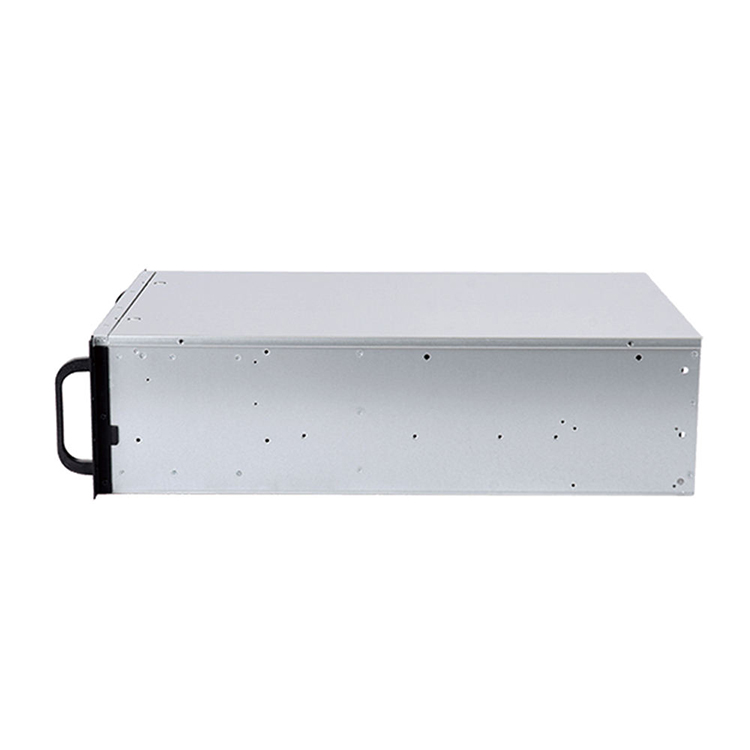
A 1U 서버 섀시 gives engineers only about 44.45 mm of nominal rack height to work with. On iSTONECASE’s current product range, published 1U examples use 40 mm fans and specialized PSU arrangements, and some configurations rely on PCIe risers for full-height expansion cards.
That forces trade-offs.
A component can be electrically compatible and still fail mechanically.
A GPU may match the motherboard’s PCIe interface but be too tall, too thick, too long, or impossible to power once its auxiliary connector is installed.
A CPU may fit the socket but require a cooler that cannot operate inside the available vertical envelope.
A motherboard may technically fit, yet its connectors can interfere with a riser, fan wall, drive cage, or cable bend.
Then there is heat.
Small fans can generate serious static pressure, which is why 1U servers can cool surprisingly powerful components. But high-speed small-diameter fans also mean the thermal system has less margin for casual component substitutions. Change the heatsink, GPU, drive population, air shroud, or cable routing and you may alter the entire airflow path.
In a standardized deployment, that is manageable.
In a constantly changing custom build, it can become painful fast.
I was recently browsing server and homelab discussions and came across a problem that captures the 1U trap almost perfectly.
One builder wanted to install existing double-slot GPUs in 1U servers and quickly discovered that the chassis format itself had become the obstacle. The resulting discussion moved straight into risers, low-profile versus full-height cards, cooling, and whether moving to 2U was the more realistic answer. A similar r/homelab discussion shows exactly how quickly a seemingly simple GPU upgrade turns into a chassis architecture problem.
I have seen variations of this mistake often enough that the pattern is easy to recognize.
The buyer chooses the enclosure first.
Then the GPU arrives.
Then someone realizes the card collides with something, needs a different riser, cannot get enough airflow, has an awkward power connector, or simply occupies more physical volume than the original design allowed.
At that point, replacing the chassis is only the beginning.
You may also be changing risers, fan brackets, power distribution, cabling, rails, drive cages, thermal assumptions, packaging, and the approved BOM.
That is why I treat the U size as a system-architecture decision.
Not a sheet-metal decision.
Choose 1U when most of these statements are true:
For a fixed-function appliance that will ship in hundreds or thousands of identical units, 1U can be excellent.
For a prototype whose hardware list changes every three weeks?
Be careful.
2U is not glamorous.
That is partly why it works.
You give up half the theoretical rack density of 1U, but you gain considerably more freedom around fans, drives, expansion cards, power supplies, and internal routing.
Dell’s current PowerEdge R770 documentation describes a 2U platform supporting two Intel Xeon 6 processors, 32 DIMM slots, and configurations reaching up to 40 EDSFF E3.S NVMe drives, with additional rear-drive options depending on configuration.
That example shows why 2U is so common in enterprise infrastructure: it can preserve serious compute density while giving the mechanical design more breathing room.
On iSTONECASE’s current 2U 서버 섀시 range, published configurations include platforms with 8, 12, or even 25 front drive positions depending on model, as well as configurations using 80 mm fans, redundant PSU options, and multiple PCIe expansion layouts.
That is a very different engineering envelope from 1U.
Imagine the first prototype uses:
Easy.
Six months later, the customer wants:
This is where extra chassis volume starts paying rent.
2U does not guarantee compatibility. You still need to verify card height, riser orientation, cooler height, PSU geometry, drive backplanes, and airflow. But you generally have more paths to solve a problem without throwing away the enclosure architecture.
That makes 2U especially attractive when specifications are still evolving.
2U is often a strong fit for:
If a buyer asks me How to Choose a Rackmount Server, 2U is often the form factor I investigate first when there is no dominant constraint forcing the design smaller or larger.
Not because 2U always wins.
Because it keeps more options alive.
Four rack units sounds huge if your only KPI is servers per rack.
Then you start installing GPUs.
Or 24 drives.
Or multiple full-height PCIe cards.
Or large motherboard formats.
Or serious airflow hardware.
Suddenly 4U looks much less wasteful.
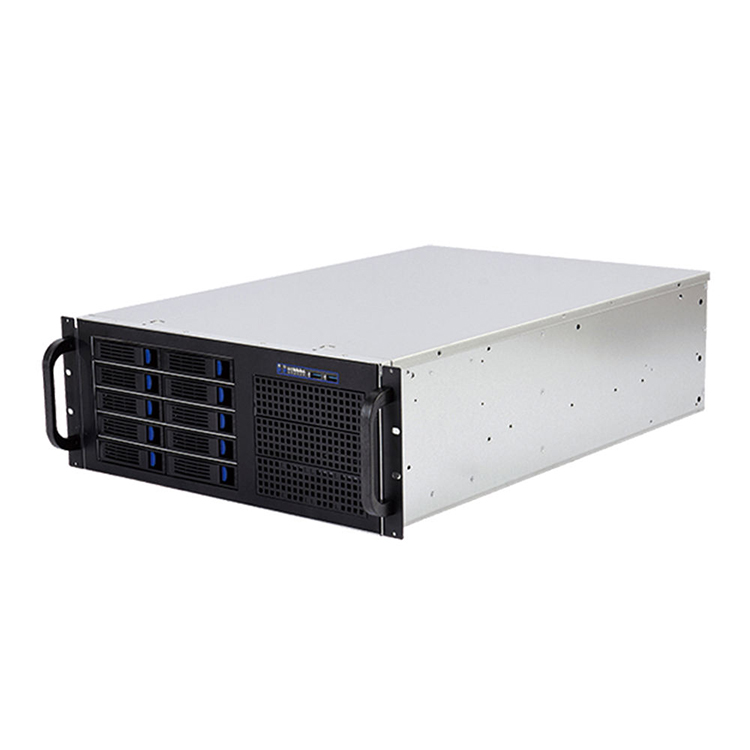
The current iSTONECASE 4U 서버 섀시 portfolio includes examples built around 24- and 36-drive storage configurations, larger 120 mm fan layouts, full-height PCIe expansion, GPU-oriented designs, and models with substantially more expansion capacity than typical 1U layouts.
The industry goes even further in accelerator systems.
In a March 2025 announcement, Supermicro stated that its 4U GPU-optimized systems could support up to 10 double-width GPUs, depending on system architecture.
That tells you what those extra rack units can actually buy.
Not empty space.
PCIe real estate. Power-delivery room. Cooling capacity. Storage. Structural support. Serviceability.
GPU servers get the attention, but 4U has another advantage: conventional components are often easier to integrate.
Standard-height expansion cards become more practical.
Larger fans can fit.
ATX-style PSU options may become possible depending on the design.
Large CPU coolers and elaborate storage cages become easier to package.
Cable routing gets less absurd.
For industrial computing, broadcast, simulation, storage, laboratory systems, custom appliances, and engineering workstations, those benefits can outweigh the loss in rack density.
There is also a service issue that procurement teams sometimes miss.
A chassis that gives technicians more physical access can reduce the amount of disassembly needed when replacing cards, cables, fans, or storage hardware. That benefit is difficult to see on a dimensional drawing, but it becomes painfully obvious during maintenance.
Choosing 1U simply because it offers the highest theoretical rack density is often false economy.
Yes, I said it.
Rack density is not project density.
If a 1U system requires more specialized risers, smaller high-speed fans, unusual cooling hardware, constrained PSUs, custom brackets, and repeated engineering work every time the customer changes a component, those saved rack units are not free.
They are being paid for somewhere else.
Engineering hours.
Qualification.
Thermal testing.
Custom parts.
Field service.
소음.
Supplier dependency.
Future redesigns.
If the workload is fixed and engineered properly, 1U can be the best option by a mile.
But when I see a project roadmap that already mentions larger GPUs, more drives, extra PCIe cards, higher CPU power, or multiple future SKUs, I would rather “waste” another rack unit today than rebuild the platform six months later.
That is not overengineering.
It is avoiding predictable rework.
| 결정 요인 | 1U | 2U | 4U |
|---|---|---|---|
| Rack density | Excellent | Good | 낮음 |
| CPU compute potential | High with engineered cooling | 높음 | 높음 |
| GPU flexibility | Limited | 보통 | Excellent |
| Full-height PCIe freedom | Usually constrained | Configuration-dependent | Strong |
| Storage capacity | Limited to high-density specialized layouts | Good to very good | Very good to excellent |
| Fan size | Usually small, high-speed | Medium | Larger options possible |
| Acoustic potential | Usually challenging | Better | Often easiest to optimize |
| PSU flexibility | More specialized | Better | Broadest in many designs |
| Cable-routing space | 타이트 | 보통 | Generous |
| 서비스 접근 | 타이트 | 보통 | Strong |
| Future hardware changes | Least forgiving | Good balance | Most forgiving |
| 가장 적합 | Dense standardized compute | General-purpose enterprise/OEM | GPU, storage, industrial, custom expansion |
The table is directional, not a compatibility guarantee.
Specific chassis designs can break these patterns.
A sophisticated 1U platform may outperform a badly engineered 4U system. A storage-focused 2U chassis can hold far more drives than a general-purpose 4U workstation-style enclosure.
The model matters.
So does the architecture.
Do not stop at “supports ATX” or “supports E-ATX.”
Confirm the actual board dimensions, standoff positions, power connectors, edge connectors, PCIe slot positions, RAM height, and cable exits.
Two boards carrying the same form-factor label can create very different integration problems.
Record:
Then model the installed card—not just the card body.
A 300 mm GPU does not require only 300 mm of chassis space. It also needs cable bend radius, airflow clearance, support, and access for assembly.
Ask a better question than “How many fans does it have?”
You need to know:
Cooling is a system.
A fan specification by itself tells you very little.
Today’s eight-drive requirement has an annoying habit of becoming tomorrow’s twelve-drive requirement.
Confirm:
Storage density can change the chassis decision surprisingly fast.
Do not specify only wattage.
A “1600 W PSU” is not a mechanical specification.
Check format, dimensions, redundancy, input requirements, connector type, cable exits, efficiency targets, hot-swap requirements, and compatibility with the expected peak load.
The server fits.
Great.
Do the rails?
Do the cable arms?
Does the rear door still close after power cables are connected?
Can a technician actually pull the unit out far enough to service it?
This part sounds basic until the rack arrives on another continent.
Ask one uncomfortable question:
What will the customer probably request next year?
More GPUs?
Faster networking?
Another HBA?
More drives?
A larger motherboard?
Higher-power processors?
Different front I/O?
If the obvious next revision already breaks your chassis, the enclosure is probably too small today.
Start with 1U.
Compact systems with predictable CPU, NIC, and storage requirements benefit directly from rack density. If the platform is standardized and the thermal design is controlled, the smaller enclosure is a genuine advantage.
Start with 2U.
The balance between density, memory, storage, cooling, and expansion gives engineering teams more flexibility while keeping rack consumption reasonable.
Evaluate 2U and 4U together.
Drive count changes everything. A dense 2U storage chassis can be extremely efficient, while 4U becomes attractive when the system needs more large-format drives, expansion cards, cooling volume, or easier service access.
Start with the accelerator specification, not the rack height.
For one modest accelerator, 2U may work.
For multiple full-height, double-width cards, the economics often push the project toward 4U or a purpose-built GPU platform. Supermicro’s current GPU portfolio illustrates just how much accelerator density can be engineered into larger rackmount architectures.
2U or 4U is often easier to customize.
These projects frequently need unusual I/O, data-acquisition cards, frame grabbers, motion controllers, custom cabling, filters, front-access controls, or specialized power hardware.
Extra mechanical volume is useful here.
Very useful.
There is no universally “best” server height.
1U is not automatically better because it is dense.
4U is not automatically better because it is large.
And 2U is not automatically the answer just because it sits in the middle.
The right choice comes from the finished hardware stack.
Start with the motherboard. Add processors and memory. Add every GPU and expansion card. Add storage and backplanes. Add the real PSU. Add fans, heatsinks, cables, rails, connectors, and service clearance.
Then look at the roadmap.
Only after that should you choose the enclosure height.
For B2B buyers, that approach changes the conversation from:
“How many U should we buy?”
to:
“What is the smallest form factor that can support this architecture reliably through its expected product life?”
That is a much better procurement question.
And it usually produces a much better server.
1U is better for maximum rack density; 2U is usually better when you need more cooling, storage, PCIe expansion, or upgrade flexibility.
The correct choice depends on the complete hardware configuration. A standardized compute node may favor 1U, while a changing OEM platform often benefits from 2U.
The main difference is vertical space: 1U is 1.75 inches high, while 2U is 3.5 inches high.
That additional height can allow larger fans, different PSU formats, more storage, improved card layouts, and greater cooling flexibility depending on the chassis design.
Yes, but only when the GPU, riser, power connection, airflow, and chassis are designed to work together.
Many conventional double-slot or tall consumer GPUs are poor candidates for generic 1U installations. Never assume PCIe electrical compatibility means mechanical compatibility.
4U is often better for multi-GPU systems because it provides more room for full-height cards, cooling, power delivery, and PCIe expansion.
Some purpose-built 4U systems are extremely dense; Supermicro has published 4U GPU configurations supporting up to 10 double-width GPUs.
The theoretical maximum is 42 1U devices.
Real deployments usually reserve rack space for networking, power equipment, cable management, storage, or other infrastructure, so usable server capacity may be lower.
2U is often a strong compromise, but it is not automatically the best choice.
It offers more mechanical flexibility than 1U while preserving better rack density than 4U. Projects dominated by maximum density may favor 1U; GPU-heavy or expansion-heavy systems may favor 4U.
No. Choose the chassis after defining the main hardware architecture.
Confirm the motherboard, CPU cooling, GPUs, storage, backplane, PSU, expansion cards, cables, rack depth, rails, and future upgrade requirements before locking the form factor.
Send the motherboard drawing, GPU configuration, storage requirements, PSU type, cooling target, rack depth, rail requirements, I/O layout, quantity, and destination market.
Detailed component information allows the supplier to check mechanical compatibility before prototyping or mass production.

Comments