저희와 상담해 보세요 서버 섀시 엔지니어 및 영업팀




구독자 24,000명
사용 목적, 섀시 유형, 랙 높이, 마더보드, GPU, 드라이브 베이, 전원 공급 장치, 냉각 시스템, I/O 및 주문 수량을 알려주십시오. 당사의 엔지니어 및 영업팀이 귀사의 프로젝트에 적합한 표준 모델 또는 OEM/ODM 구성을 추천해 드리겠습니다.

Selecting an enclosure for a GPU sounds easy.
Find the card length. Find the chassis specification. Compare the two numbers.
Done.
Except that this is exactly how expensive compatibility mistakes begin.
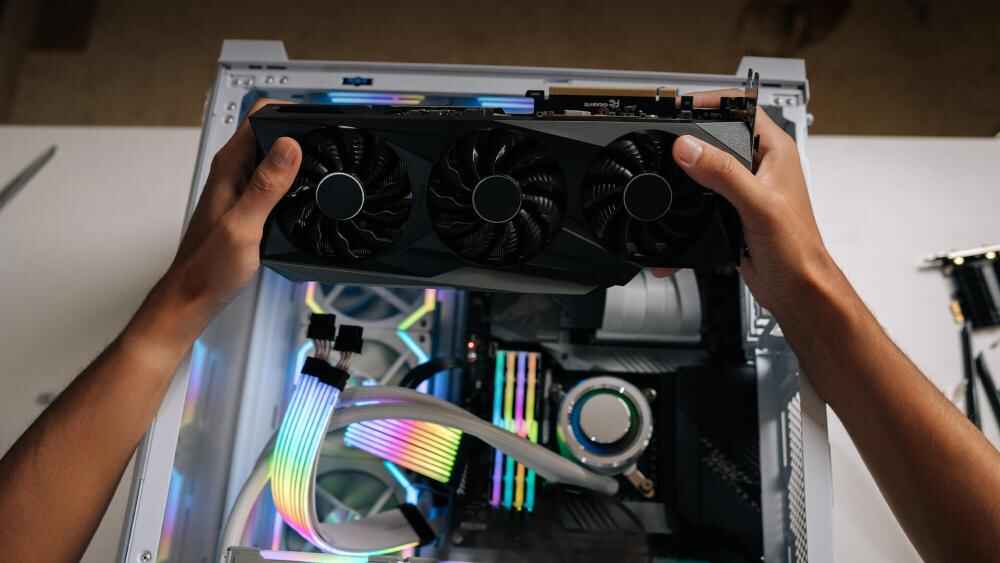
A GPU listed at 330 mm does not necessarily fit comfortably inside an enclosure advertising 350 mm of maximum GPU clearance. The missing 20 mm may disappear after you add a front fan wall, radiator, power connector, retention bracket, cable bundle, sheet-metal flange, or the angle required to physically get the card through the opening.
That distinction matters far more in B2B hardware projects than it does in a one-off desktop build.
If you are ordering 100, 500, or 2,000 systems, “we can probably make it fit” is not a compatibility specification.
It is a future rework bill.
When engineers discuss GPU dimensions, there are three obvious measurements:
Those numbers matter.
They are just not enough.
The real installation envelope can also include:
That is why buyers researching Graphics Card Dimensions for GPU servers should start with the actual production card rather than assuming every card based on the same GPU will occupy the same mechanical envelope.
The silicon may be the same.
The metal around it often is not.
Here is a useful real-world comparison.
NVIDIA currently publishes its GeForce RTX 5090 Founders Edition at 304 mm long and 137 mm wide. Its installation guidance goes further: NVIDIA says the enclosure should provide space for a 304 × 137 × 61 mm installation envelope, while another 36 mm of space should be planned for power cables. NVIDIA also recommends reserving clearance around the graphics card equivalent to another unused expansion slot to improve airflow.
NVIDIA GeForce RTX 5090 specifications and enclosure guidance — opens in a new tab
Now compare that with another card using the same GPU.
MSI lists the GeForce RTX 5090 32G SUPRIM SOC at 359 × 150 × 76 mm.
MSI GeForce RTX 5090 SUPRIM SOC specifications — opens in a new tab
Same RTX 5090 GPU family.
Very different enclosure problem.
| Mechanical Check | RTX 5090 Founders Edition / NVIDIA Guidance | MSI RTX 5090 SUPRIM SOC | 중요한 이유 |
|---|---|---|---|
| Card length | 304 mm | 359 mm | 55 mm difference can eliminate entire chassis options |
| Published width/height dimension | 137 mm | 150 mm | Taller cards leave less side-panel and cable space |
| Installation/card thickness reference | 61 mm installation envelope | 76 mm card dimension | Multi-slot designs consume adjacent expansion volume |
| Extra power-cable space | 36 mm recommended | Must be checked against connector/cable used | Card fit does not guarantee cable fit |
| Exact model verification | Required | Required | GPU family name alone cannot approve compatibility |
That 55 mm length difference is roughly 18%.
For chassis engineering, 55 mm is huge.
It can be a fan.
A drive cage.
Part of a power supply.
A retention structure.
Or the difference between closing the lid and starting over.
Here is the position I take with buyers:
Maximum GPU length is one of the least useful enclosure specifications when it is presented alone.
Sounds harsh?
Consider what the number actually tells you.
If a chassis advertises “maximum GPU length: 350 mm,” you still do not know whether that figure assumes:
A buyer sees:
GPU: 330 mm
Chassis limit: 350 mm
Twenty millimeters of margin.
Looks safe.
I would not approve it.
That 20 mm may already belong to something else.
This is why GPU Enclosure Compatibility should be evaluated against the complete installed system rather than a chassis datasheet in isolation. The site’s high-density enclosure guidance makes the same engineering point: GPU fit interacts with card spacing, connector clearance, retention, airflow, cabling, and service access.
NVIDIA’s SFF-Ready guideline provides a useful benchmark because it does not focus on GPU length alone.
For qualifying enthusiast GeForce cards, the current guideline specifies:
NVIDIA says these limits are intended to preserve space, clearance, and working room inside compatible small-form-factor cases.
NVIDIA SFF-Ready Enthusiast GeForce Card guidelines — opens in a new tab
Notice one particularly useful detail:
The cable bend radius is included.
That is an engineering mindset.
The GPU is not a rectangular brick floating in CAD. Power has to enter it. Air has to reach it. A technician has to install it. The enclosure still needs to close afterward.
Do this before measuring anything else.
Do not write:
GPU: RTX 5090
Write:
GPU manufacturer:
Exact model:
Exact part number:
Revision if applicable:
Why?
Because add-in-board manufacturers create their own coolers, PCBs, shrouds, brackets, backplates, and connector layouts.
NVIDIA itself states that graphics card specifications can vary by add-in-card manufacturer and advises users to check the manufacturer’s specifications for the actual shipping model.
This matters even more when procurement has multiple approved suppliers.
Imagine engineering validates Card A.
Purchasing later substitutes Card B because the GPU chip, memory capacity, and performance look equivalent.
Electrically?
Maybe fine.
Mechanically?
You may have just added 40 mm to the cooler.
Your approved enclosure is no longer approved.
Length gets most of the attention, so start there.
But establish your reference points.
For an enclosure project, you normally want to know the distance between the rear PCIe mounting plane and the furthest forward feature of the installed GPU.
Do not casually exclude:
Then compare that with the usable enclosure space.
Not the outside chassis depth.
Not the distance from rear panel to front panel.
Usable space.
If a 600 mm deep enclosure has a 38 mm fan wall, backplane structure, front I/O assembly, cable zone, and sheet-metal reinforcements in front of the GPU, none of those millimeters belong to your graphics card.
When comparing GPU Length Clearance across rackmount platforms, verify what hardware is installed when the manufacturer quotes the limit. The site’s 4U GPU chassis range itself varies in internal layout, PCIe capacity, cooling structure, and motherboard support, so the nominal rack height alone does not answer GPU fit.
This measurement causes more trouble than many buyers expect.
Why?
Power connectors.
A tall GPU might fit beneath the chassis cover while bare.
Then the power cable goes in.
Now the connector housing and cable need to turn.
Suddenly the lid touches the cable.
Bad situation.
For its RTX 5090 installation guidance, NVIDIA explicitly recommends 36 mm of additional space for power cables beyond the stated card clearance.
That is why the measurement should not stop at:
PCB to side panel.
Instead calculate:
GPU height + connector projection + safe cable bend + tolerance = required enclosure height envelope
And use the actual power cable you expect in production.
A soft lab cable and a short, stiff high-current harness can behave very differently.
“2-slot.”
“2.5-slot.”
“3-slot.”
“3.5-slot.”
These descriptions are useful shorthand.
They are not substitutes for millimeter dimensions.
One manufacturer’s “3-slot” cooler may not occupy exactly the same thickness as another manufacturer’s.
For dense systems, record both:
This becomes especially important when evaluating GPU Slot Thickness in a rackmount platform. A form factor that technically provides enough PCIe slots may still lack the physical spacing, cooling volume, or riser arrangement required by the chosen cards. The site’s 1U, 2U, and 4U comparison similarly treats GPU support as part of a wider rack-density and cooling decision rather than an expansion-slot count alone.
For multi-GPU systems, thickness affects another variable:
pitch.
If cards sit too close together, the system may still assemble perfectly.
Then thermals suffer.
Physical fit passed.
System design failed.
This is where CAD models frequently become too optimistic.
A simplified GPU model may show the card body.
It may not show the connected cable.
Add the actual connector and create a realistic keep-out volume around it.
확인:
Do not bend a high-current cable sharply simply because CAD says there is no collision.
Mechanical fit must respect how the real harness needs to sit.
Case specifications often become conditional here.
A chassis may support a long GPU.
A chassis may support a thick radiator.
The dangerous assumption is:
therefore it supports both at the same time.
Not always.
Some enclosure designs use the same internal volume for alternative configurations.
No radiator?
More GPU room.
Install a radiator and fan stack?
GPU clearance drops.
The same applies to:
This is why the installed configuration should appear in the compatibility drawing.
Do not approve isolated components.
Approve assemblies.
Large GPUs are not only getting physically larger.
They are heavy.
The site’s existing engineering guide notes that current graphics cards can exceed 2 kg and explains how a retention structure changes the mechanical load path between the GPU and chassis.
That bracket needs room too.
And this is where a real forum case caught my attention.
A builder had a chassis officially rated for a 369 mm maximum GPU and a graphics card listed at 357 mm.
On paper?
Twelve millimeters spare.
Easy.
Then installation started.
The GPU mounting bracket collided with a front fan. The builder removed the fan. The bracket then hit the frame supporting the front fan assembly. After forcing the bracket into place, the graphics card itself still could not be maneuvered comfortably into the chassis without tilting it through awkward angles.
The buyer had even checked compatibility tools beforehand.
The numbers said yes.
The physical system said no.
The original forum discussion shows exactly why a 1D specification can fail in a 3D assembly.
That story sticks with me because the mistake was not stupidity.
The buyer checked the specifications.
The specifications were simply incomplete for the decision being made.
This gets missed constantly.
CAD shows the GPU sitting perfectly inside the enclosure.
Great.
How does it get there?
A long GPU may need to be:
Now imagine only 5 mm of nominal free space exists at the far end.
The final position works.
The insertion path does not.
For production systems, ask engineers to model or physically test the installation sequence.
The GPU should not require:
If assembly technicians need “the trick” that only one senior engineer knows, the design is not production-friendly.
A GPU that barely fits can still be the wrong GPU for the enclosure.
Cooling needs space.
NVIDIA’s RTX 5090 guidance recommends leaving clearance around the graphics card equivalent to another unused expansion slot because it can improve airflow.
That should change the buying question.
Do not ask only:
Will the card fit?
Ask:
Will the card fit while receiving the airflow it was designed to use?
For air-cooled GPU servers, inspect:
A 76 mm card stuffed into a 77 mm cavity technically fits.
That does not make it good thermal engineering.
Now assume the GPU fails six months after deployment.
Can a technician remove it?
This sounds like tomorrow’s problem.
It becomes today’s design requirement very quickly when the system is in a data center, factory, edge cabinet, or overseas customer site.
Ask:
Good enclosure design protects service time as aggressively as it protects component fit.
Procurement should not send:
Need chassis supporting RTX 5090.
That leaves too much interpretation.
A better RFQ includes:
| GPU Input | What to Provide |
|---|---|
| Manufacturer | Exact GPU vendor |
| 모델 | Full commercial model name |
| Part number | Manufacturer part number |
| Length | Maximum installed card length |
| 높이 | Maximum card height |
| Thickness | Millimeters plus slot classification |
| 무게 | Card mass |
| Power connector | Type and physical location |
| Cable keep-out | Required bend and routing space |
| PCIe orientation | Direct slot, riser, vertical, horizontal |
| Quantity | Number of GPUs per enclosure |
| 냉각 | Blower/open-air/liquid-cooled configuration |
| Retention | Required support or restraint method |
| 서비스 경로 | Required GPU removal direction |
| Approved alternatives | Every alternate GPU SKU |
If you need a repeatable sourcing workflow, How to Measure GPU Clearance should become part of the RFQ package rather than a measurement made after suppliers quote. The site’s chassis RFQ guide already recommends providing GPU interfaces, controlled drawings, critical dimensions, cooling requirements, and production configuration before pricing.
That saves arguments later.
“What did you mean by supports this GPU?”
Exactly.
Define it before the PO.
There is no universal magic number.
Five millimeters may be plenty in one direction and useless in another.
The right margin depends on:
I prefer functional clearance over arbitrary clearance.
예를 들어
A 20 mm empty zone in front of the GPU is less valuable than 10 mm placed exactly where the power cable, retaining latch, or technician’s fingers need it.
Margin should solve a defined problem.
Not make a drawing look comfortable.
For each direction, create a dimensional stack.
For length:
Rear mounting plane → GPU body → forward keep-out → fan/radiator structure
For height:
PCIe reference → GPU height → power connector → cable bend → chassis cover
For thickness:
Motherboard/riser reference → GPU cooler → airflow gap → adjacent GPU or chassis wall
Then add applicable manufacturing and assembly tolerance.
This quickly exposes optimistic specifications.
If the total available space is 360 mm and your combined requirement is 359 mm, the CAD model may turn green.
I would still be nervous.
Production parts are not mathematical surfaces.
If your enclosure must support three approved cards, do not prototype with the smallest one.
Install the longest.
Then the tallest.
Then the thickest.
If those characteristics belong to different models, test all relevant extremes.
Also populate:
Then remove the GPU.
And reinstall it.
A prototype that only proves “we managed to assemble it once” is weak evidence.
Repeatability matters.
If I had to reduce this entire article to one procurement rule, it would be this:
Never approve a GPU enclosure from the GPU name and maximum chassis length alone. Approve an exact card SKU inside an exact system configuration.
That changes the question from:
Does this enclosure support RTX 5090?
to:
Does this enclosure support this exact RTX 5090 card, in this PCIe position, with this power cable, fan wall, retention system, airflow requirement, assembly path, and service procedure?
Longer question.
Much cheaper answer.
For custom GPU server projects, send the chassis manufacturer the exact GPU model, mechanical drawing, quantity, motherboard layout, power-cable requirements, retention method, fan arrangement, and rack-depth limits before freezing the enclosure.
Millimeters are cheap during design.
They get expensive after production.
Check GPU length, height, thickness, slot count, power-connector position, and required cable clearance.
Also verify cooler overhangs, rear bracket geometry, retention hardware, airflow gaps, and the installation/removal path. Nominal card dimensions alone may not represent the complete installed envelope.
Compare the exact GPU model against the enclosure’s usable internal clearance in all three dimensions.
Then subtract space occupied by fans, radiators, drive cages, brackets, cables, risers, and other hardware. A length-only comparison is not enough.
There is no single clearance value that works for every enclosure.
Leave enough space for manufacturing tolerances, cable routing, airflow, assembly, and servicing. The location of the free space matters more than simply adding an arbitrary number of millimeters.
Yes. GPU thickness determines how many PCIe slots and how much lateral space the card consumes.
It also affects airflow, adjacent GPU spacing, riser design, and whether other expansion cards remain usable. Record actual thickness in millimeters rather than relying only on “2-slot” or “3-slot” labels.
No. Maximum GPU length is only one part of compatibility.
A card can satisfy the length specification but still collide with a fan, radiator, support bracket, power cable, chassis frame, or side panel.
Always check the exact model and part number.
Different manufacturers can build cards around the same GPU with very different coolers and dimensions. Current RTX 5090 examples differ by more than 50 mm in length.
The connector and cable can require significant space beyond the GPU body.
For example, NVIDIA’s RTX 5090 installation guidance recommends planning 36 mm of additional space for power cables. A GPU can physically fit while its power connection cannot.
Use drawings first, then validate the final assembly with a physical prototype.
Install the exact GPU, cables, fans, retention hardware, risers, and adjacent components. Check assembly, airflow, side-panel closure, service access, and GPU removal before approving volume production.

Comments